Notifications: toasts and dialogs
Toasts and dialogs are Pardon's two ways of telling someone something. Both carry a title, a short body and up to two buttons, and both report which button was pressed.
| Toast | Dialog | |
|---|---|---|
| Where | Bottom-right corner, above other windows | Centre of the screen |
| Width | 380 px | 480 px |
| Good for | "Heads up, X is happening" in a sentence or two | An announcement people should actually read |
| Auto-dismiss | Optional (timeout_seconds) | No |
Toasts
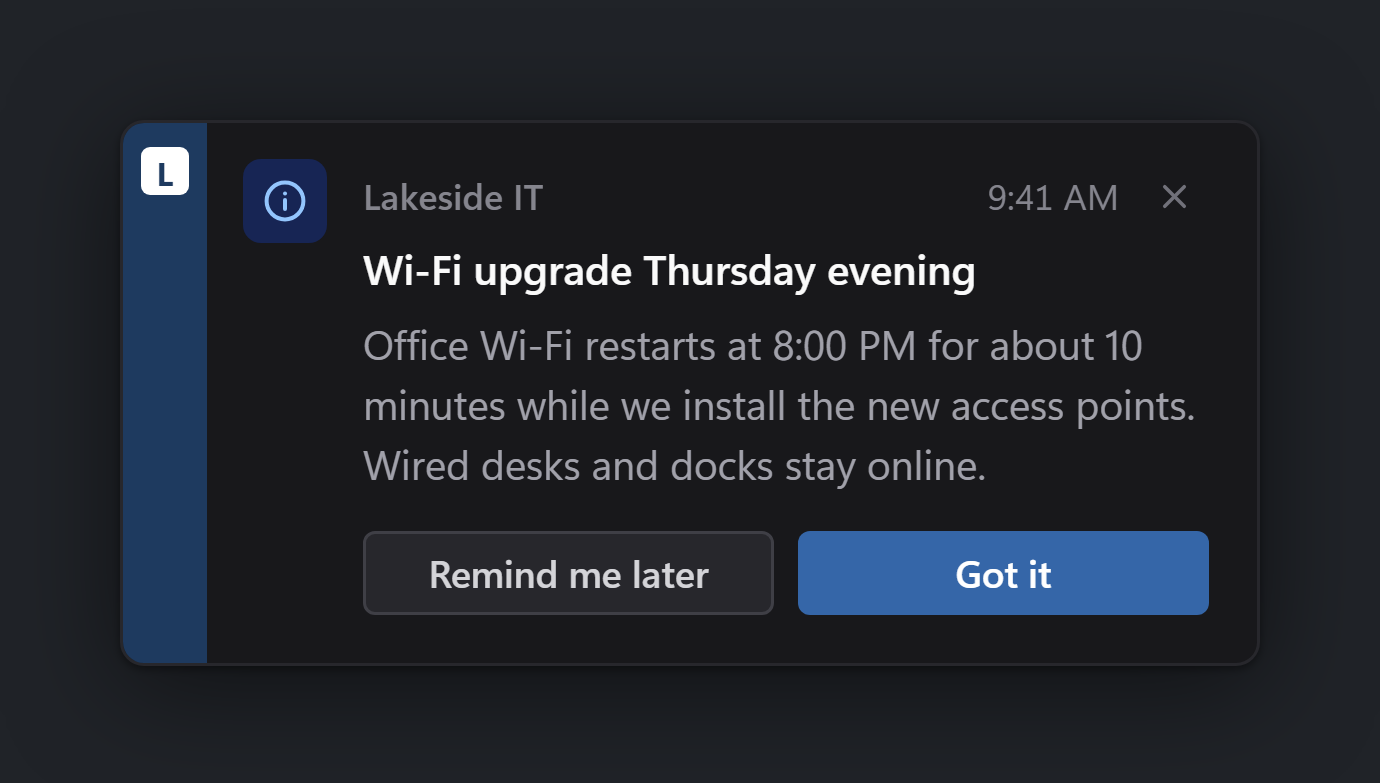
{
  "schema": "campaign/v1",
  "campaign_id": "wifi-upgrade-2026-08",
  "type": "toast",
  "severity": "info",
  "title": "Wi-Fi upgrade Thursday evening",
  "body": "Office Wi-Fi restarts at 8:00 PM for about 10 minutes while we install the new access points. Wired desks and docks stay online.",
  "buttons": [
    { "id": "later", "label": "Remind me later", "style": "secondary", "outcome": "dismissed" },
    { "id": "ack", "label": "Got it", "style": "primary", "outcome": "acknowledged" }
  ],
  "branding": { "org_name": "Lakeside IT", "accent": "#1e3a5f" }
}
Critical toasts
Set "severity": "critical" for something that needs doing today. The icon turns red and an ACTION REQUIRED flag appears next to your name.

{
  "schema": "campaign/v1",
  "campaign_id": "pw-expiry-2026-08-15",
  "type": "toast",
  "severity": "critical",
  "title": "Update your password today",
  "body": "Your network password expires at 5:00 PM. Press Ctrl+Alt+Del and choose 'Change a password', or tap below for the walkthrough.",
  "buttons": [
    { "id": "done", "label": "Done already", "style": "secondary", "outcome": "acknowledged" },
    { "id": "howto", "label": "Show me how", "style": "primary", "outcome": "acknowledged", "url": "https://lakeside.example/help/password" }
  ],
  "branding": { "org_name": "Lakeside IT", "accent": "#1e3a5f" }
}
Severity only changes the icon and its tint (info, warning, critical, success, neutral). It never changes your brand colour, so a critical message from you still looks like it came from you.
Dialogs
A dialog is the same idea, wider and centred, for something with more to say.

{
  "schema": "campaign/v1",
  "campaign_id": "vpn-upgrade-2026-08",
  "type": "dialog",
  "severity": "info",
  "title": "Your VPN is getting an upgrade",
  "body": "Starting Monday, Aug 18, the VPN client updates itself the next time you sign in. Sign-in looks a little different: you'll approve a prompt on your phone instead of typing a code. Your saved connections carry over, and nothing changes for you today.",
  "buttons": [
    { "id": "learn", "label": "Learn more", "style": "secondary", "outcome": "acknowledged", "url": "https://lakeside.example/vpn" },
    { "id": "ack", "label": "Got it", "style": "primary", "outcome": "acknowledged" }
  ],
  "branding": { "org_name": "Lakeside IT", "accent": "#1e3a5f" }
}
Buttons
You get at most two buttons. However you order them in the JSON, the secondary one sits on the left and the primary one on the right. Mark the main action "style": "primary"; if you don't mark either, the last button you list takes the primary spot.
Each button's id and label come back in the result, so your script can tell which was pressed. Its outcome decides the exit code (acknowledged, exit 0, unless you say dismissed, exit 2), and an optional url opens a help page in the user's browser. The campaign reference (reference coming soon) has the details.
The ✕ in the corner always reports dismissed (exit 2), as does closing the window any other way.
Timeouts, expiry and busy users
- Let a toast go away on its own with
timeout_seconds. Nobody answering is thentimeout, exit 3. - Stop stale news with
expires_at. If your RMM only gets to a laptop a week late, Pardon shows nothing and reportssuppressed(exit 7) instead of announcing last Thursday's outage. - Leave presenters alone. By default Pardon holds a message while someone is presenting or in a full-screen app, and you can add quiet hours. See Quiet hours and busy users.
- Learn something about the machine with
"dex_snapshot": true, which adds uptime, pending reboot, free disk and similar facts to the result. It is handy for spotting the PC that hasn't restarted in a month.
The campaign reference (reference coming soon) lists every field and its default.
What comes back
{
  "schema": "result/v1",
  "campaign_id": "wifi-upgrade-2026-08",
  "type": "toast",
  "host": { "name": "DESK-4021", "domain": "LAKESIDE", "os": "Windows 11 Pro", "os_build": "22631.4169", "tool_version": "0.1.0" },
  "context": "user",
  "user": "LAKESIDE\\alice",
  "shown_at": "2026-08-15T16:12:03-05:00",
  "answered_at": "2026-08-15T16:12:09-05:00",
  "elapsed_ms": 6180,
  "outcome": "acknowledged",
  "exit_code": 0,
  "detail": { "button": "Got it", "button_id": "ack" }
}
elapsed_ms is how long the message was on screen before the answer, which is a decent read on whether people are actually reading what you send. Every field is described in the results reference (reference coming soon).